
Concepts & Architecture
Architecture Overview
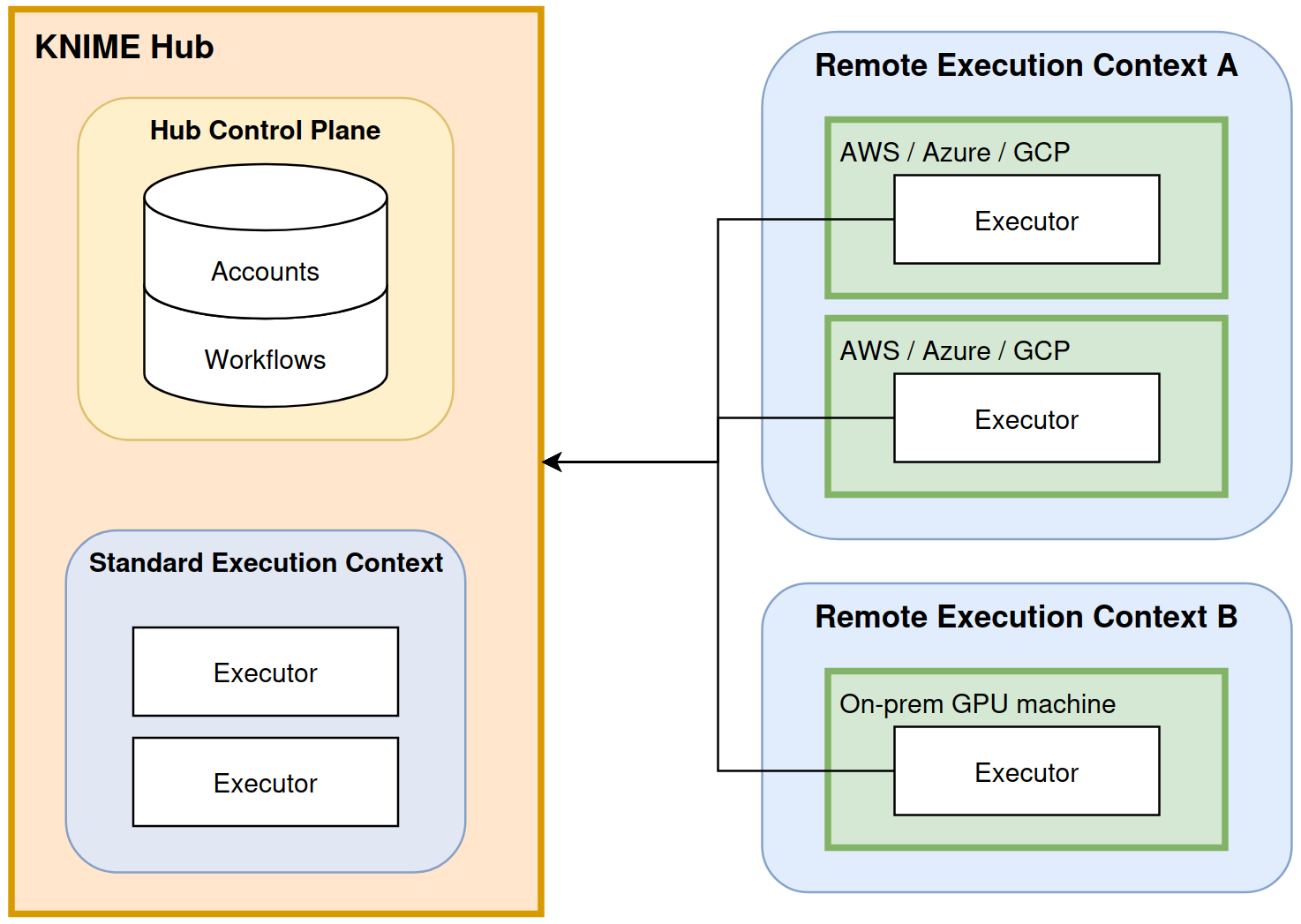
Sovereign execution splits the KNIME environment into two planes:
Control Plane (KNIME Hub): Manages the "Who, What, and When." It stores the workflows, schedules the jobs, and provides the user interface.
Compute Plane (Sovereign Executor): Manages the "How." It consists of the Agent (the communicator) and the Executor (the engine). Executors run in customer-managed infrastructure (physical, virtual, on-prem, or cloud).
The connection is always outbound from the Agent to the Hub using Secure WebSockets (WSS), meaning you do not need to open any inbound holes in your corporate firewall.
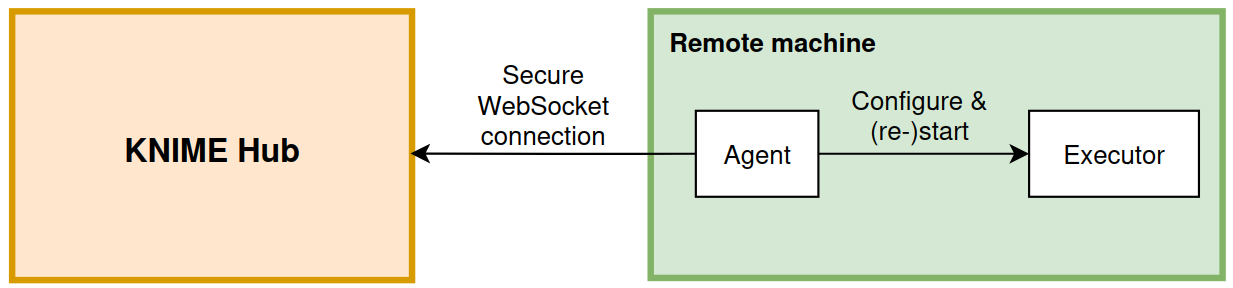
A sovereign executor consists of two cooperating services that run on the same machine:
KNIME Executor: A headless instance of KNIME Analytics Platform that performs the actual workflow execution. It requires the KNIME Executor Connector and KNIME Remote Workflow Editor for Executor extensions.
KNIME Hub Executor Agent: A lightweight agent process that establishes and maintains the connection to KNIME Hub. It is responsible for configuring the executor and starting or restarting the KNIME Executor as needed.
Data Governance & Security
Sovereign execution allows workflows to run in customer-controlled environments. Depending on user actions and configuration, execution data may either:
- Be persisted in KNIME Hub, or
- Be routed through KNIME Hub temporarily.
When Data Is Persisted to KNIME Hub
In some situations, execution data such as node outputs and execution state is stored in Hub.
1. Automatic Job Swapping
A job can automatically be saved to Hub if all of the following conditions are met:
- The job is paused or finished.
- The job has not been explicitly discarded.
- The configured Max job time in memory has been exceeded.
When a job is swapped to Hub, its execution state and post-execution data are persisted and can be inspected later. If the job is deleted, all associated data is deleted as well.
Prevent automatic job swapping
To prevent jobs from being saved to Hub automatically:
- In the execution context, set Max job life time to a value smaller than Max job time in memory.
- To prevent users from modifying these values, mark both timeouts as final in the execution context configuration.
Note: Marking configurations as final can only be done via the API.
2. Saving a Job as a Workflow
If a user selects Save as workflow, the job’s execution state is stored in Hub. This includes:
- Node execution state
- Post-execution data
This behavior cannot currently be disabled.
3. Editing Workflows in the Browser
When a workflow is edited directly in Hub and nodes are executed during the session, the execution state is saved when the editing session ends.
Prevent saving execution state during editing
Disable workflow editing for the sovereign execution context.
4. Explicit Writes to Hub
If a workflow contains Writer nodes configured to write to a Hub space, data is intentionally stored in Hub.
This behavior depends entirely on workflow design.
When Data Is Routed Through Hub (Without Being Persisted)
Some interactions require data to pass through Hub temporarily in order to display results in the browser.
This data transfer is transient and not intended for persistent storage.
Viewing Node Outputs or Interactive Views
Transient data transfer occurs when:
- Inspecting a job
- Editing a workflow
- Running a Data App
In these cases, a subset of the required data (for example table previews, charts, or views) is transferred via Hub to the browser.
Temporary object storage
If the transferred data exceeds 5 MB, it may be temporarily stored in Hub’s object store to enable the transfer.
This temporary storage:
- Exists only for the duration of the job
- Is automatically removed afterward
Certificate Authority (CA) Handling
- Agent: Uses the operating system’s trust store and automatically reads trusted CAs from system configuration.
- Executor: Does not automatically use the system trust store; CA certificates must be explicitly configured in the executor’s keychain/trust configuration.