
Error handling
Different types of errors, such as a failing connection to a remote service or an inaccessible database, can occur when you run a workflow. Handle them with a Try-Catch enclosure. The Try part executes one or more nodes. If the Try part fails, the Catch branch handles the error. Otherwise, the Default branch runs. At the end of the Try-Catch enclosure, the enclosure collects the results from the successful or failed execution.
The following example shows a Try-Catch enclosure. Find it on Knime Community Hub.
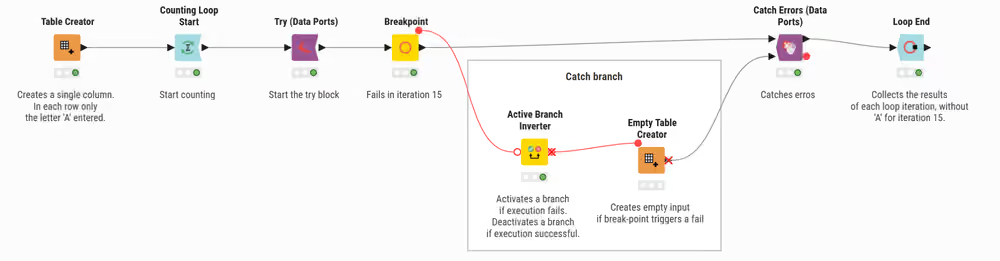
In the workflow, the Try (Data Ports) node begins the enclosure, followed by the Breakpoint node, which is configured to fail at the fifteenth iteration (breakpoint enabled). If the Try part fails, the Catch branch runs.
The Active Branch Inverter node begins the Catch branch for error handling. This node makes an inactive branch active, and an active branch inactive:
- It activates a branch if execution fails
- It deactivates a branch if execution is successful
The Catch Errors (Data Ports) node closes the Try-Catch enclosure:
- If execution is successful, the node outputs the result from the Default branch. Connect the Default branch to the top input port of the Catch Errors (Data Ports) node.
- If execution fails, the output of the enclosure comes from the Catch branch. Connect the Catch branch to the bottom input port of the Catch Errors (Data Ports) node. The flow variable output of the node then reports the reasons for the failure.
Besides data tables, you can also start the Try part with a flow variable, using the Try (Variable Ports) node instead.
Use one of the following nodes to end the Try-Catch enclosure:
- Catch Errors (Data Ports)
- Catch Errors (Var Ports) if the outputs of the Catch and Default branches are flow variables
- Catch Errors (Generic Ports) for models
Find the nodes for a Try-Catch enclosure in the node repository, under Workflow Control → Error Handling.