
Optimize workflows for cost and speed
Knime is entirely cloud-based: you can edit and run workflows via your browser and this needs no local compute resources. Because node execution happens on Knime-managed infrastructure instead of your machine, it's metered through execution credits. One execution credit is a unit of compute usage you pay for only when a node runs. Credit consumption is calculated as node execution time × compute class multiplier. A few precautions keep your workflows fast, efficient, and credit-light.
INFO
Workflow editing i.e. adding and configuring nodes in a workflow, does not consume execution credits. Credits are consumed only upon node execution.
Reduce credit consumption
Right-size the environment compute class
Since the credit consumption is calculated according to the environment compute class, using a lighter environment can help you reduce the execution cost. You can select a smaller compute class for workflow editing and scale up to a more powerful compute for the execution in production.
Light compute environments also suit workflows dominated by DB processing nodes or nodes that call an external system, such as HTTP request nodes. These workflows spend most of their execution time waiting on the external system rather than running local computation. As a result, a lighter environment costs less without a noticeable difference in execution time.
INFO
For some nodes, Knime applies a reduced multiplier of 0.1 to their execution time, regardless of compute class. See Understanding execution credits for details.
Develop against a sample, scale up for real data
Use nodes such as the Row Sampling or Row Filter to filter a subset of rows from the data while developing a workflow. This reduces execution time while letting you iterate through the nodes to set up the workflow logic. Once the workflow is developed, remove the sampling and execute the workflow on the entire dataset.
You can also develop a workflow on sample data and then capture parts of it using integrated deployment. See Integrated deployment guide.
Avoid unnecessary node execution when iterating
Resetting a node (for example, by editing its configuration) resets all the nodes downstream. This applies to every connection - data, flow variable, database and so on. Make sure to reset a node only when necessary and mind the downstream nodes.
Cache expensive intermediate results
If an expensive step (e.g. a heavy join or a model training) feeds multiple downstream nodes or gets run multiple times, write its result to a space using, for example, the Table Writer or Model Writer nodes. Read the precomputed data instead of recomputing it each time.
Additionally, you can save a version of the workflow with some nodes still executed (not reset), and disable the option to reset the workflow before execution. When you next run it, Knime skips the already-executed nodes instead of recomputing them, saving execution credits. Keep in mind that saving a partially executed workflow uses more disk space than a reset one, since it has to store the results of every executed node.
Optimize workflow performance
The following best practices do not directly reduce credit consumption, but they keep your workflows fast and efficient.
Read data efficiently
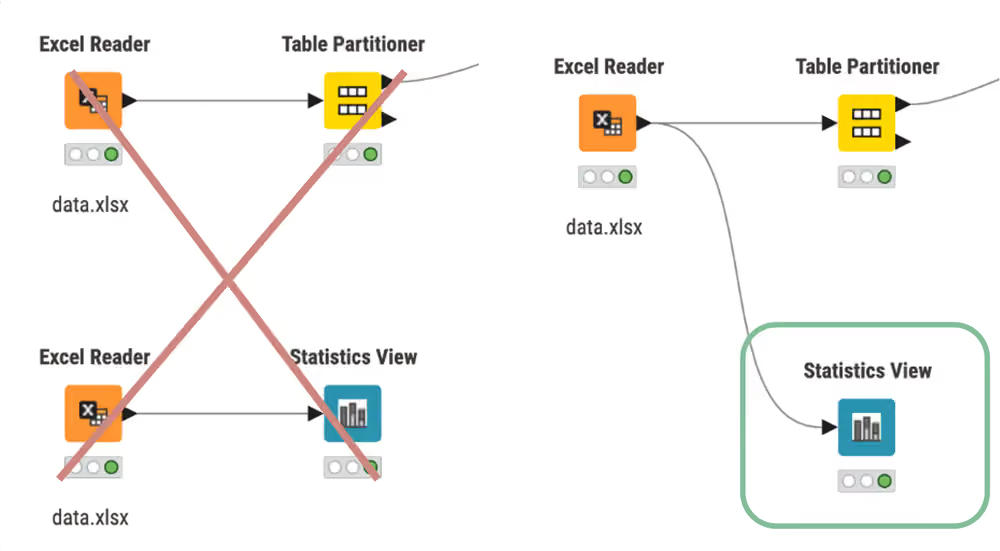
Avoid reading a file multiple times. Do not use a reader node each time you need the same file for different data operations. Instead, use multiple connections to connect the same reader node to more than one downstream node.
Read multiple files with the same structure with one reader node. By selecting the Files in folder mode you can concatenate the content of multiple files from the same folder into the same output table.
Do not read unnecessary data. Reader nodes offer an option to remove unused or redundant columns before reading them.
Design efficient workflows
Remove workflow branches that are not actively needed, especially before deploying a workflow, to avoid unnecessary node execution.
Remove any disconnected nodes or components that might make your workflow fail when run as a deployment.
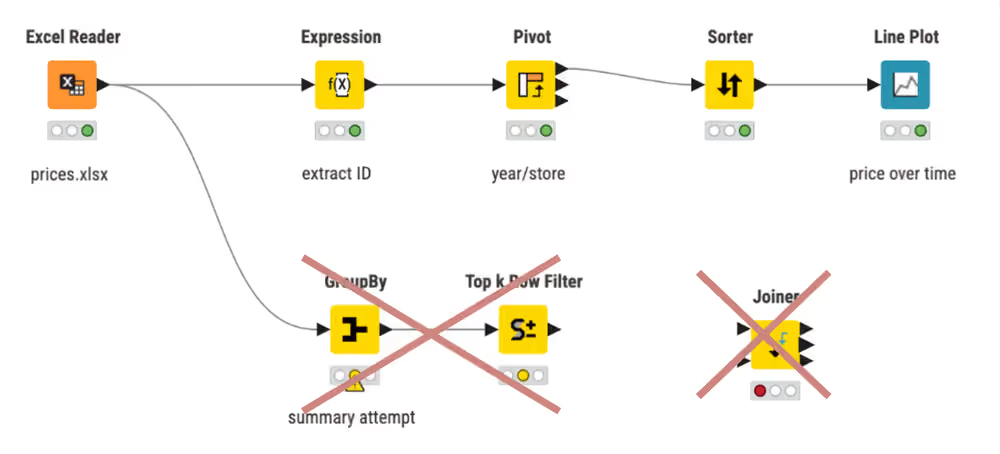
Some data manipulation operations are more computationally expensive than others. Prefer simpler solutions to avoid unnecessarily expensive operations, for example:
- Joins: Joining two tables with the Joiner node to then filter for criteria is slow. Instead, replace a few rows with the Value Lookup node, that compares and matches your data to a dictionary containing your criteria.
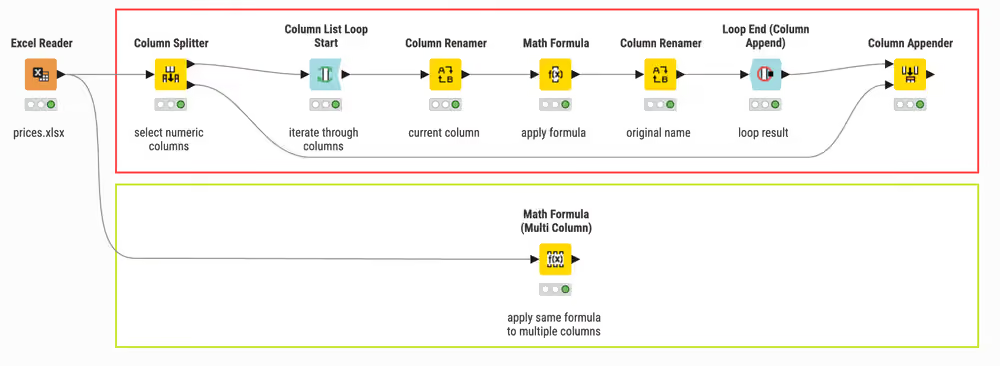
- Loops: Depending on your data and iterations, loops may slow down your workflow. Thus, use loops only when absolutely needed. Instead, try Multi Column nodes to operate on strings in multiple columns at once.
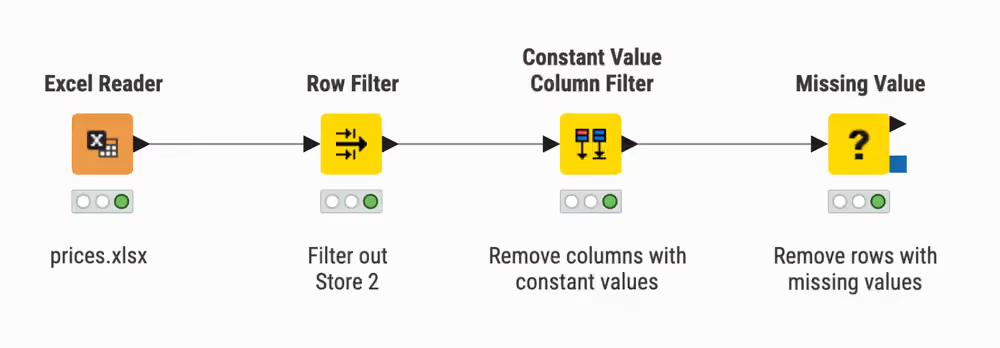
- Filter out data that you don't need as early as possible. Avoid carrying rows and columns that are not needed in downstream computations.
Measure performance with Timer Info node
To measure which nodes take the longest to execute in your workflow you can use the Timer Info node. It reports individual and aggregate timing and execution information for all nodes. This allows you to identify weak points in your workflow and track your progress over time.
Process in memory in supported nodes
The GroupBy and Pivot nodes offer an option to process the data in memory, which reduces the execution time avoiding sorting the data before calculation.
Streaming execution
Some nodes and components allow streaming execution. Unlike the default execution that operates node-by-node, in streaming execution nodes are executed concurrently. Each node passes data to the next as soon as it is available, i.e., before the node is fully executed. In particular, all data are divided into a number of batches which are streamed one by one. Especially, when reading or preprocessing data, streaming execution accelerates runtime.
In Streaming Execution intermediate results are not available because no data is cached.
To switch from default to streaming execution, create a component and select the "Simple Streaming" option in its configuration dialog. The streamable component is now marked with an arrow in its lower right corner.
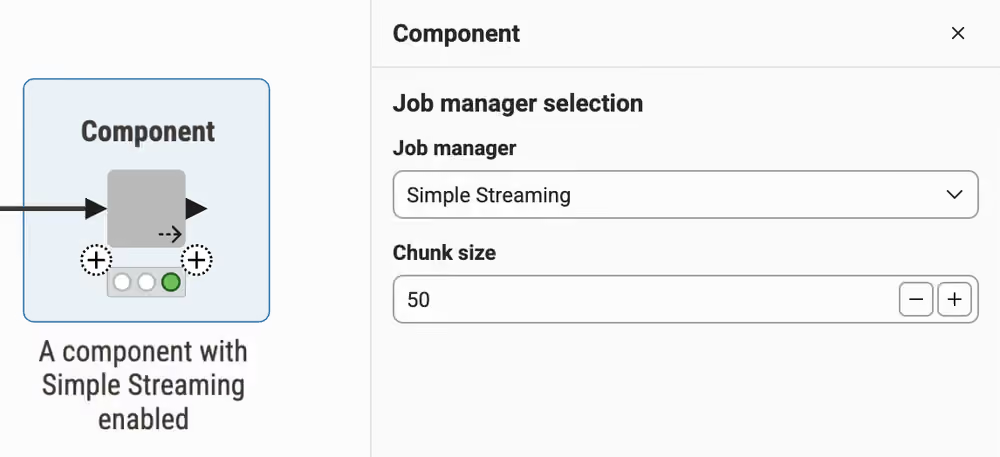
For further reading on Streaming Execution, consult the Knime Components Guide.
Parallelize branch execution with loops
Another way to speed up workflow execution is parallel computing. You can implement this with loops. They iterate over a certain part of the workflow, e.g. over a workflow branch. Each iteration, a repeated procedure, has different input. Among others, this input can consist of chunks of the data you want to process. These chunks will each be processed in parallel on separate workflow branches.
After reading the data, and before your first data manipulation, you can add the Parallel Chunk Loop Start node. It splits data into equally sized chunks for each iteration. Then it executes the manipulations in the loop body on each chunk in parallel. You can configure either the number of chunks or the number of rows per chunk. At the end of a parallel chunked block, add the Parallel Chunk End node. It collects and concatenates the results from the parallel workflow branches.
For more details about loops, please refer to the Loops Guide.
In-database processing
In addition to reading data from a database, you can perform in-database processing, i.e. data manipulation directly on the database, using the dedicated nodes, e.g. DB Joiner or DB GroupBy and formulating your query. Their configuration is similar to the simple manipulation nodes and does not require SQL coding, since the nodes themselves construct and output a SQL query. Since those nodes are only used to build the query, their computation time is minimal and does not depend on the size of the data. The execution of the query happens in the database itself only when the DB Reader node is executed. See the database guide to learn more.
Mind re-execution in data apps
Components are the building blocks of data apps. Each component with visualization nodes creates a page in the data app. To capture the user input, the nodes inside the components are re-executed when jumping from one page to the next one, or when re-execution is enabled in a widget node. Thus, avoid placing expensive computations inside components, to reduce the number of nodes re-executed.
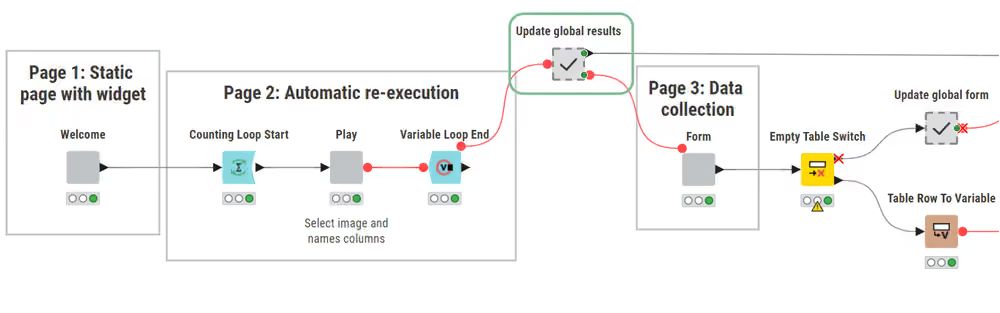
Refer to the Component guide for more info about components.