
Pass data to agent tools
Enable an agent to trigger tools that process data tables and use the results to continue reasoning.
In KNIME, agents do not inspect data tables directly. Instead, they call tools that operate on data and return messages or results the agent can reason about.
When this is useful
Pass data to agent tools when you want an agent to:
- Analyze datasets (for example, reviews, logs, or records)
- Filter or transform data conditionally
- Run data-driven checks or validations
- Combine reasoning with data processing
If your agent only reasons over text without operating on data, you do not need to enable data ports.
Agents reason, tools process data
Agents decide what to do. Tools handle how data is processed.
How data flows in agent workflows
Data exchange between agents and tools follows a clear pattern:
- Data is provided to the agent workflow
- The agent calls a tool providing the data in input
- The tool processes the data
- The tool returns a message or produces data in output
- The agent uses that output to continue reasoning
At no point does the LLM powering the agent directly inspect raw tables itself.
Pass data to tools
Prerequisites
- An agent workflow with tools provided
(see Provide tools) - One or more tools that operate on data tables
- A dataset available in the agent workflow
1. Enable data ports on the agent
By default, the Agent Prompter node does not include data ports.
To enable data exchange:
- Select the agent node in the workflow editor
- Click the plus (+) icon that appears
- Choose Add Input Port or Add Output Port
- Select the appropriate table type
Once added, you can connect data tables directly to the agent node:
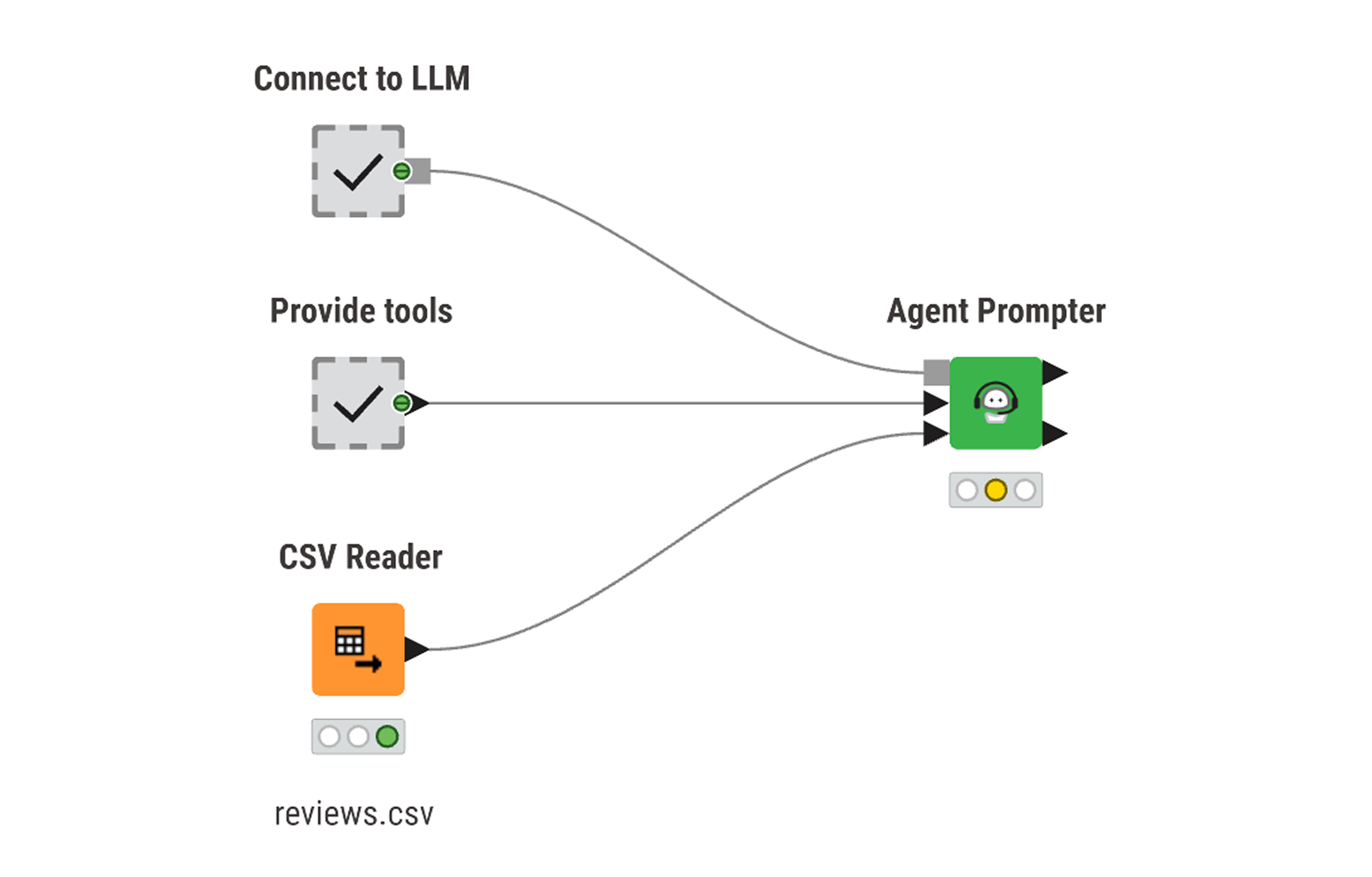
Data ports are explicit
Data ports must be added manually. If no data port is present, the agent cannot receive or return data.
2. Define data input for tools
Tools that operate on data must explicitly define what they expect as input.
To accept data from the agent:
- Add a Workflow Input node to the tool workflow
- Describe the expected table structure and content (e.g. what it contains, in which columns etc..)
(column names, types, and meaning)
This description helps the agent understand how and when to use the tool, and which data can be passed to it.
3. Process data inside the tool
Inside the tool workflow:
- Use KNIME nodes to process the data coming from the Workflow Input node
- Apply filtering, aggregation, transformation, or analysis logic
All data processing happens inside the tool, not in the agent.
4. Return results to the agent
To communicate results back to the agent:
- Use Tool Message Output to return a message the agent can read
- Optionally use Workflow Output to return a data table
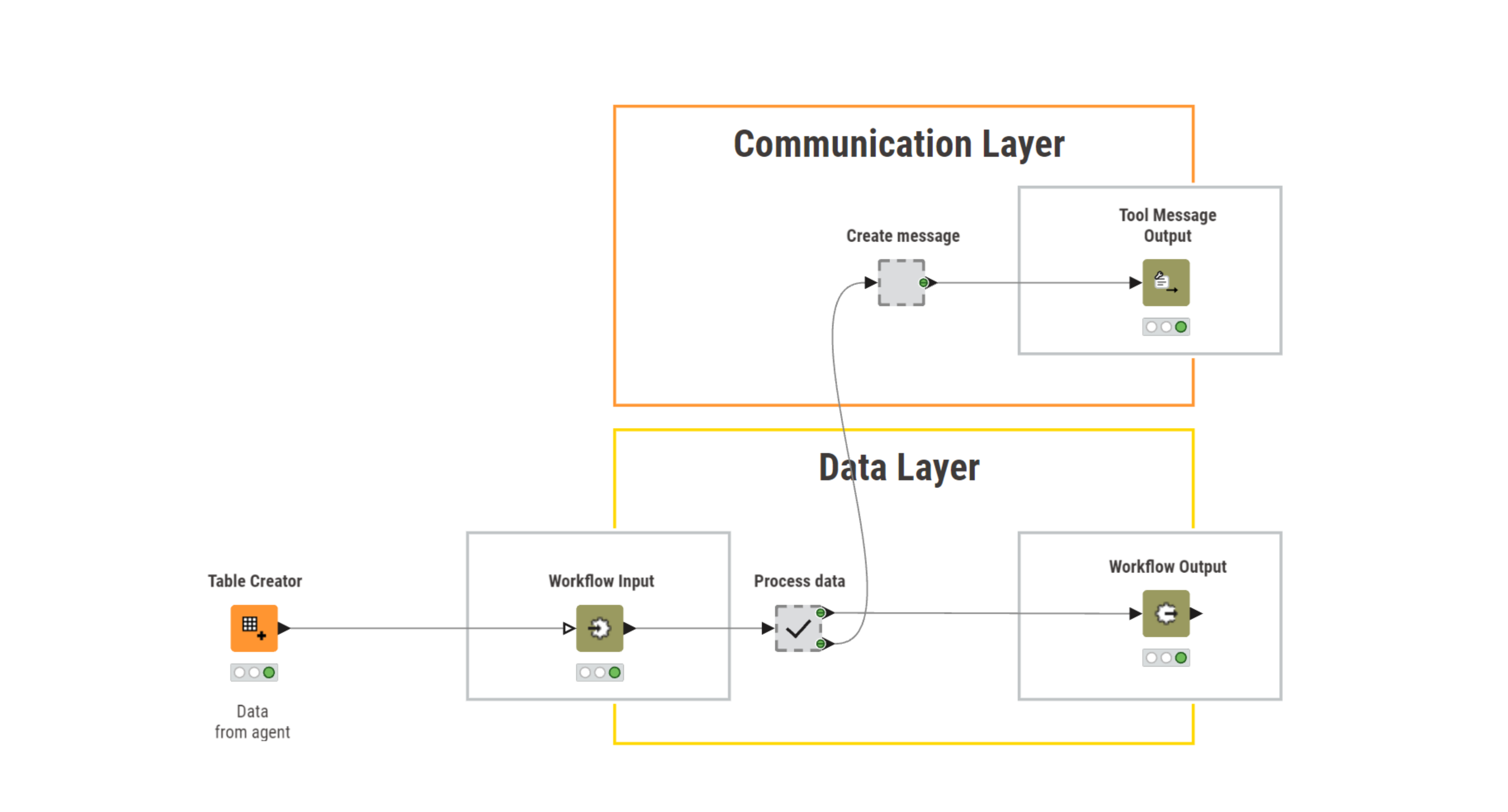
The agent reasons only over the message returned by the tool. Returned tables can be passed to other tools or downstream workflows.
Result
The agent can now:
- trigger tools that operate on data
- reason over summaries or outcomes
- combine data-driven insights with other tools or prompts
This enables agents to handle real-world, data-backed tasks.
Next steps
- Build an agent step by step: create a restaurant assistant