
Turn a workflow into a tool
Prepare a KNIME workflow so it can be called by an agent as a tool.
In KNIME, a tool is a callable workflow with clearly defined behavior, inputs, and outputs. The agent does not inspect the workflow logic directly. Instead, it relies on metadata and outputs that you explicitly expose.
When this is useful
Turn a workflow into a tool when you want an agent to:
- Perform a specific subtask
- Reuse existing workflows as agent capabilities
- Call workflows conditionally during its reasoning process
- Combine multiple tools to solve complex tasks
If you only want to run a workflow directly, without agent involvement, you do not need to turn it into a tool.
How tools work in KNIME
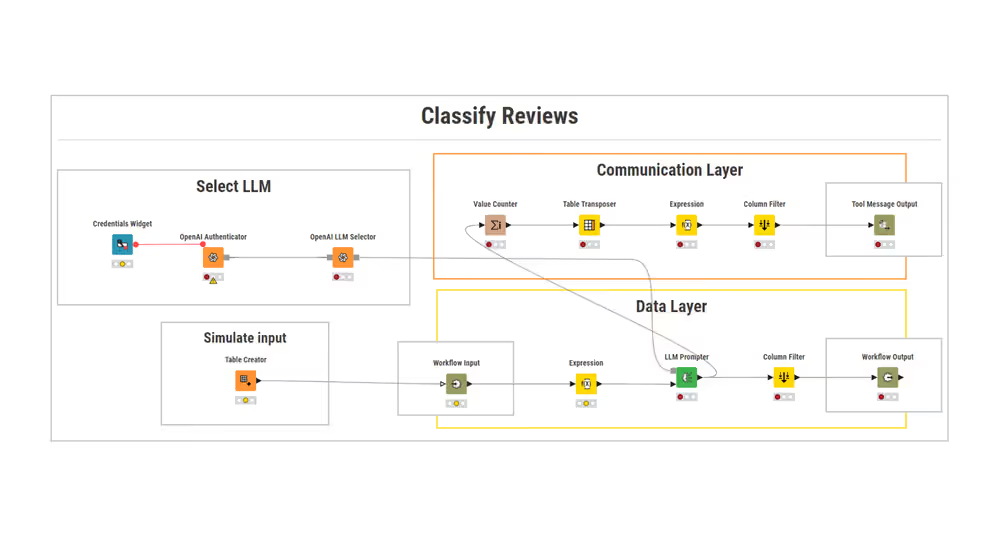
Each tool interacts with an agent through two layers:
Communication layer
Defines what the tool does and what message it returns to the agent.Data layer (optional)
Defines what data the tool receives and what data it outputs.
A tool may use only the communication layer, or both layers, depending on the task.
Prepare a workflow as a tool
Prerequisites
- A KNIME workflow that performs a single, well-defined task
Describe the tool for the agent
The agent decides when to use a tool based on its description.
Open the workflow's Info panel and add a clear description that explains:
- what the tool does
- what kind of requests it can handle
- what it returns to the agent
Be concise and explicit. The description is part of the tool's metadata and is used directly by the agent during reasoning.
Tool descriptions matter
A precise description significantly improves the agent's ability to select the correct tool. Vague descriptions lead to unreliable tool usage.
Define tool parameters (optional)
If the tool requires input values (for example, a date, a number, or a category), define them using configuration nodes such as:
Each parameter should have:
- a clear name
- a short description explaining what it controls
The agent uses this metadata to assign parameter values dynamically based on the user request.
Return messages to the agent (communication layer)
To return a message the agent can read and reason about, add a Tool Message Output node.
This node:
- reads the first cell (row 1, column 1) of its input table
- sends the content as a message back to the agent
Use it to return:
- confirmations
- summaries
- key findings
- fallback messages
Define data input and output (data layer, optional)
If the tool operates on data tables, define the data interface explicitly.
To accept data from the agent:
- Add a Workflow Input node
- Describe the content of the expected table
To return data from the tool:
- Add a Workflow Output node
- Describe the content of the table produced by the tool
The agent never inspects the data directly. It only triggers the tool and receives messages or results produced by the workflow.
Visualizations are shown in the chat
If a tool workflow contains a View node (for example, Bar Chart or Line Plot), it is automatically displayed as output in the chat. This works with the Agent Chat View node. No additional output node is required.
Separate reasoning from data processing
Let tools handle data processing. Return only the information the agent needs to continue reasoning.
Result
The workflow is now a valid tool that:
- can be discovered during tool registration
- exposes clear metadata for agent reasoning
- accepts parameters or data (if defined)
- returns messages or results to the agent
Once saved, the workflow can be provided to an agent.
This is a tool workflow showing LLM selection, a communication layer that returns a Tool Message, and a data layer with Workflow Input/Output:
Next steps
- Build an agent step by step: create a restaurant assistant
- Provide tools to be discovered by agents
- Prompt an agent to trigger tool usage