
What is Knime
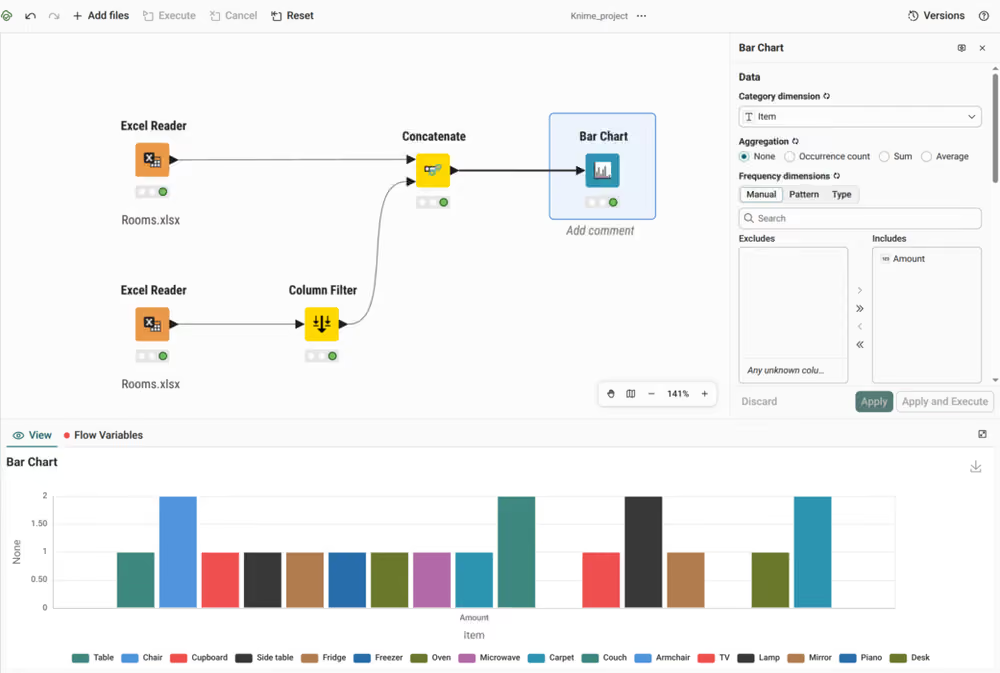
Knime is a single cloud product for the whole data project lifecycle, available on the Business and Enterprise plans. Your organization purchases a plan and sets up your account. You open a browser, sign in, and build a workflow in the workflow editor. A workflow is a diagram of connected steps that reads your data, transforms it, and produces a result. You then execute, deploy, and share the workflow in the same place. Knime hosts and runs everything for you, so there is nothing to install on your computer and no server to maintain.
Use cases
Some common uses of Knime in a data project:
- Creating a unified picture of your project by combining and refining data from various sources
- Discovering hidden trends and patterns from your data through machine learning models
- Building easy-to-use interactive data apps for anyone to create insights
- Sharing findings from your data as reports
- Streamlining routine tasks to be deployed automatically or called through an API
How it works
One platform, from first draft to production
Building and running are not separate tools. Once a workflow does what you want, you deploy it in the same place you built it: on a schedule, in response to an API call, or as an interactive data app that colleagues use through their browser without opening the workflow. You can also present results as reports.
Nothing is rewritten or handed over for this step. The workflow you tested is the workflow that runs in production, which removes a common source of error between a prototype and a live process.
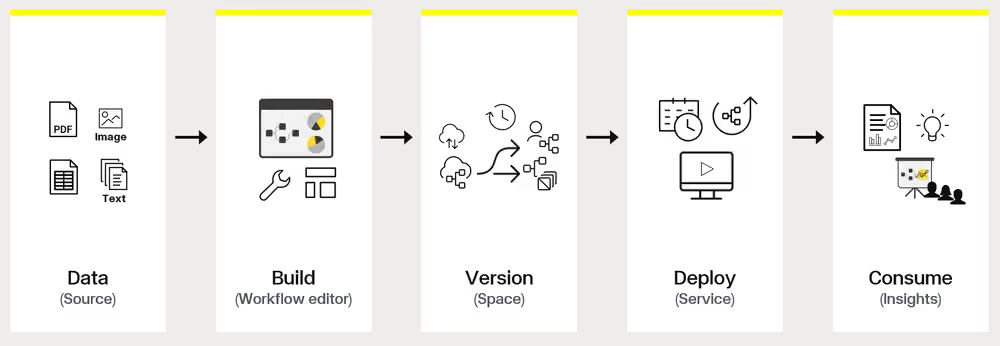
Everything runs in the browser
There is no installation, no upgrade project, and no extensions to add — you always work on the current version. Execution happens on Knime-managed infrastructure rather than your laptop. Performance doesn't depend on the machine you happen to be using, long jobs continue after you close the tab, and you can work with full-size data instead of a sample. You can also pick up where you left off from any computer.
Your work stays traceable and reproducible
A workflow records every step it took, in order, and keeps that record with the results. When someone asks how a number was produced, you can trace it back through the diagram to the source data instead of reconstructing the reasoning from memory. Running the workflow again on the same data produces the same result.
Workflows are versioned in spaces, so you can see what changed, when, and by whom, and return to an earlier version. Because the work lives in a shared platform rather than on individual laptops, a colleague can open, review, and rerun it — the analysis belongs to the team, not to one person's machine.
AI is built into the platform
K-AI, the integrated AI assistant, works alongside you in the editor. Describe what you want in plain language and K-AI recommends the nodes for it, builds or modifies part of the workflow, and answers questions about how the platform works. It lowers the starting point for a newcomer, since you don't need to know a node's name to find it.
AI also works in the other direction: nodes that call large language models let you put AI inside the workflows you build, for tasks such as classifying text, summarizing documents, or driving an AI agent.
Who uses Knime
Knime is for people whose work depends on getting an answer out of data, not only for specialists. Data analysts, business analysts, scientists, and engineers use the same platform. Tasks normally split across separate tools — cleaning data, analyzing it, presenting results, automating the whole thing — all happen in one place.
Not everyone builds. People who create and edit workflows are builders; colleagues who only open a data app or read a report are consumers, and they need no knowledge of how the workflow works.
Key concepts
- Workflow — A visual diagram of connected nodes that transforms raw data into a result. See nodes and workflows.
- Node — A single building block that reads, transforms, analyzes, or visualizes data. See nodes and workflows.
- Space — A container that stores workflows, components, and data, and controls who can access them. See spaces and organisation.
- Deployment — A workflow made available in production on a schedule, via an API call, from another workflow, or as a browser-based app. See deployments.
- Execution credit — The unit of metered compute consumed while a node runs. See optimize workflows for cost and speed.
- K-AI — The integrated AI assistant that answers questions, recommends nodes, and builds workflows from prompts. See what K-AI can do.
Next steps
- Sign in and get oriented with your first login
- Build something end to end with your first workflow