
K-AI Assistant for Python Code
KNIME Analytics Platform includes a built-in AI assistant, K-AI, which can help you write, explain, and debug Python code directly within the Python Script nodes.
Writing Python Code with K-AI
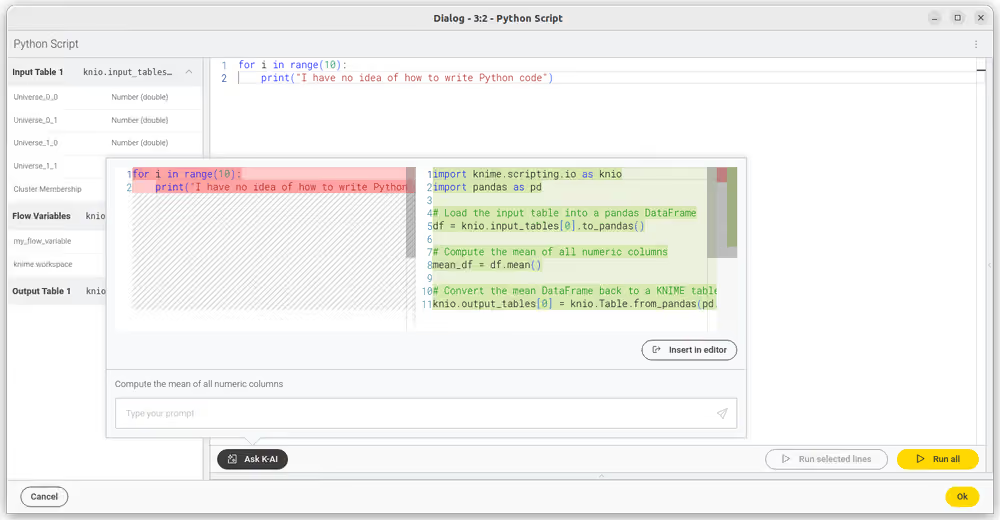
The "Ask K-AI" feature within the configuration dialog of a Python Script node is an advanced AI-assisted code generation tool. When activated, you can input prompts specifying the intended functionality. K-AI has contextual awareness of the KNIME Python API, your input data's structure, and the current script content in the editor.
- Open the Python Script node: Double-click the node to open the configuration dialog.
- Access the K-AI panel: Click the Ask K-AI button to open the prompt interface.
- Write a prompt: Ask K-AI to perform a specific data manipulation task. For example:
- "Filter the dataset to include only rows where 'Sales' is greater than 1000."
- "Convert the 'Date' column to datetime format."
- "Calculate the moving average of the 'Revenue' column."
- Review the Diff: Once the assistant generates the code, it is presented to you in a diff-editor format, which highlights the differences between your current code and the new suggestion.
- Accept or Discard: You have the option to review these suggestions and choose whether to accept them into your script or discard them, providing a high degree of control over the changes made to your code.
Debugging and Explaining Code
K-AI is also useful when you have existing code that is throwing an error or that you don't fully understand:
- Explain Code: Select a block of Python code and ask K-AI to "Explain this code". It will break down what the script is doing conceptually.
- Fix Errors: If your node execution fails with a Python exception, you can prompt K-AI with the error message. It will analyze your script and suggest a fix.
Privacy and Data
When using K-AI inside a Python node:
- Schema Context: K-AI is automatically aware of your input table's column names and data types to write accurate code.
- Data Privacy: K-AI does not read your actual data rows (cell values).
Data Transmission
When you use Ask K-AI, the current code from the editor, your input data's schema, and your prompt are sent over the internet to the configured KNIME Hub and OpenAI. This is necessary for the AI to tailor code suggestions to your script's context. Keep this in mind if you are working with sensitive column names or proprietary schema information.