
Manual Python Executable / Start Script
If you do not use Conda or Pixi, you can point KNIME Analytics Platform to any Python executable or shell/batch start script.
Via the Preferences page (AP-wide)
- Go to File → Preferences → KNIME → Python.
- Choose Manual.
- Point KNIME to either:
- A Python executable directly.
- A start script that activates an environment and launches Python.
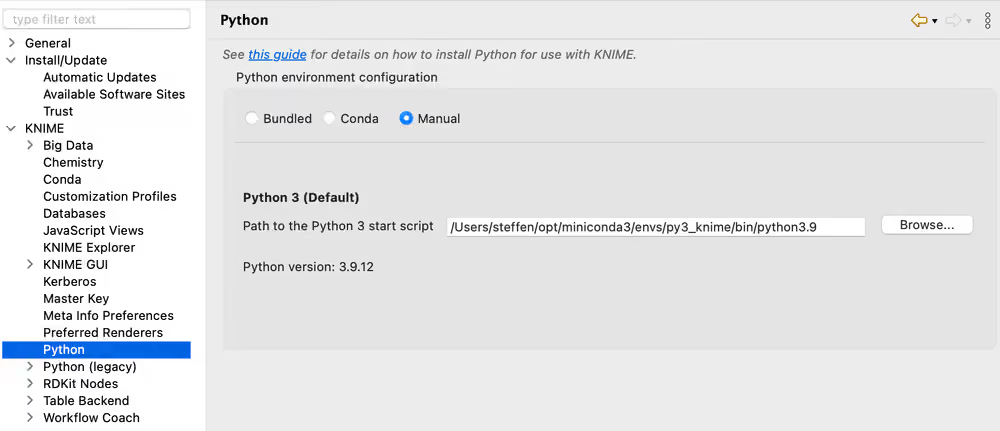
Start script requirements
The script must:
- Start Python with the arguments passed to the script (escape spaces correctly).
- Forward standard output and standard error from the Python process.
- Not output anything else.
Linux / macOS example
bash
#!/bin/bash
export PATH="<PATH_TO_ANACONDA>/bin:$PATH"
conda activate <ENVIRONMENT_NAME>
python "$@" 1>&1 2>&2
Make the script executable: chmod gou+x py3.sh
Windows example
batch
@REM Adapt the folder in the PATH to your system
@SET PATH=<PATH_TO_ANACONDA>\Scripts;%PATH%
@CALL activate <ENVIRONMENT_NAME> || ECHO Activating python environment failed
@python %*
INFO
These examples use Conda commands. Replace the Conda-specific parts if you use a different environment manager (e.g. venv, pyenv).
Via flow variable (per-node)
You can also configure individual Python nodes to use a specific executable or start script by setting the flow variable python3_command under the Flow Variables tab in the node's configuration dialog. The variable accepts the same path to a Python start script as described above.