
Work with Microsoft OneLake
Microsoft OneLake is Fabric's unified data lake for your organization. It comes automatically with every Fabric tenant.
Before you start
You need:
- A Microsoft Fabric Workspace Connection created using the Microsoft Authenticator node (see Authenticate to Microsoft Fabric)
Connect
Use the Microsoft OneLake Connector node to work directly with data files stored in OneLake.
- Connect the Microsoft Fabric Workspace Connection output to the Microsoft OneLake Connector node.
- Configure the path to the data you want to access. See OneLake path syntax for format rules.
- Execute the node.
The output is a Microsoft OneLake file system connection. Use it in downstream nodes to read, write, browse, list, and copy files. For an overview of file handling in KNIME, see the KNIME File Handling Guide.
Data loss risk
Depending on the data store type, creating, modifying, moving, or deleting files or subfolders may be restricted or only allowed in the Files folder. The Tables folder contains Delta Lake files managed by Fabric and must not be modified directly. Attempting to do so triggers the following error: Execute failed: Status code 400, "{"error":{"code":"OperationNotAllowedOnThePath","message":"PUT call is not allowed on Tables path"}}".
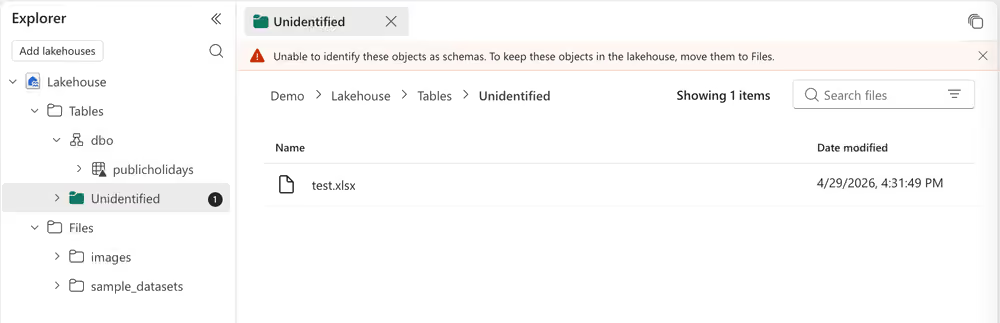
The screenshot below shows what happens in Microsoft Fabric when a file is written directly to the Tables folder: Fabric cannot identify it as a schema and flags it as unidentified. To access data in Tables, use the Delta Table Reader (Labs) node instead.
Read Delta tables
In Microsoft Fabric, Delta Lake tables store data as compressed columnar Parquet files combined with a JSON transaction log.
- Add and configure a Microsoft OneLake Connector node as described in Connect.
- Connect its output to the input of a Delta Table Reader (Labs) node. The file system connection enables browsing and file selection in the node.
- Execute the Delta Table Reader (Labs) node to load the latest snapshot of the specified table.
Next steps
- Work with Microsoft Fabric Data Warehouse
- See this example workflow on the KNIME Hub for an example of working with the OneLake file system.