
Deprecated database framework
KNIME Analytics Platform 5.3.0 introduced a deprecation mechanism for older JDBC drivers. This page explains what deprecation means, how deprecated drivers behave, and when you should act.
Background
The KNIME Database Extension replaced an older database framework that used different node names (for example, Database Reader instead of DB Query Reader) and a separate driver registration page. The older framework is now deprecated. Existing workflows that use deprecated nodes continue to work, but KNIME recommends migrating them to the current framework.
For the full list of deprecated nodes and their replacements, see Deprecated node mapping.
How deprecated drivers work
Older JDBC driver versions become deprecated when the database vendor no longer supports them or when they contain known security vulnerabilities. KNIME marks deprecated drivers clearly in the node dialog. If a workflow selects a deprecated driver, the workflow editor displays a warning.
| Deprecated driver in node dialog | Warning in workflow editor |
|---|---|
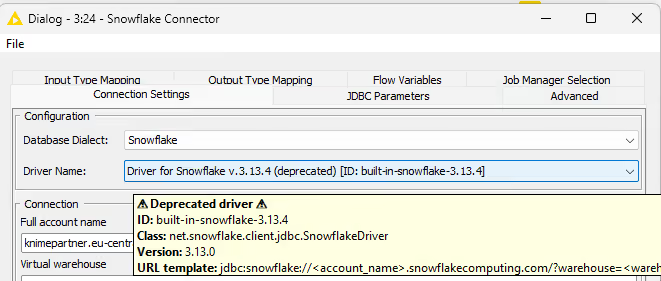 | 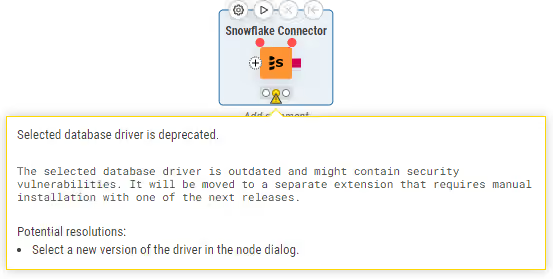 |
After a deprecation period, KNIME removes deprecated drivers from the platform. If a workflow still references a removed driver, KNIME displays an exception that identifies the extension to install to restore access.
Reinstalling a removed driver
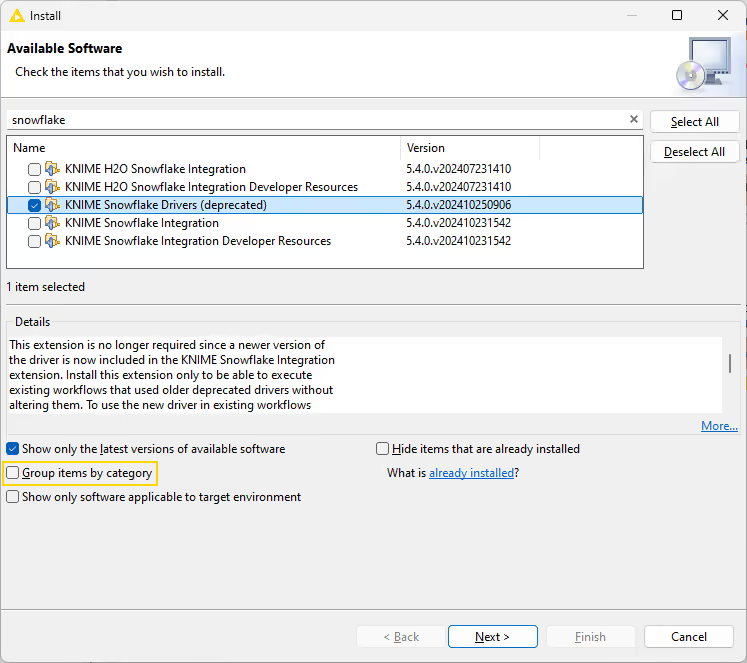
To install a deprecated driver extension:
- Open the installation dialog as described in the KNIME Analytics Platform Installation Guide.
- Deselect Group items by category.
- Search for the extension name shown in the exception.
- Select the extension and install it.
- Restart KNIME Analytics Platform.
The example below shows the deprecated Snowflake driver being reinstalled.
Use cases
You opened a workflow with a deprecation warning
The workflow still executes. Review the warning, check whether a supported driver is available for your database, and update the connector node to use the current driver.
A driver was removed and the workflow fails
Install the deprecated driver extension as described above, or migrate the workflow to use a current connector node with a supported driver.